Sunday, February 5, 2017

Smart Home: HomeKit, MQTT, DHT22, ESP8266, LUA and NodeMCU.

Inspired by my friend and humidity issues in my bathroom I decided to have some fun and start making my home more inteligent.

First attempt - make humidity and temperature sensor which will present data on my iPhone "Home" App. While it looks not complicated when we split it into pieces we need the following components:


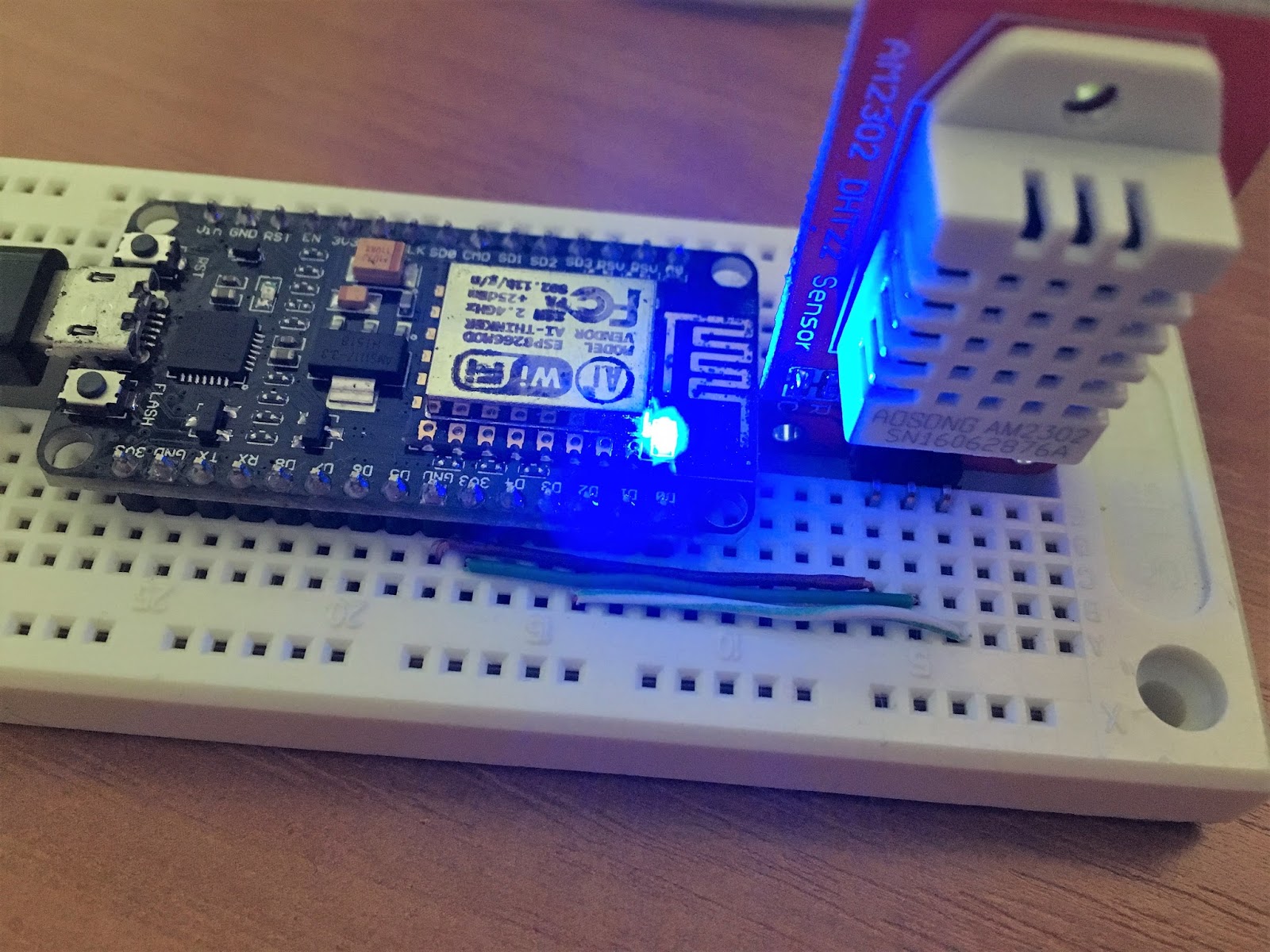
- Temperature/Humidity Sensor //DHT22
- Wireless module, capable of reading sensor data and sending it somewhere // ESP8266/NodeMCU
- Some software smart enough to receive and understand data from sensor, identify from which potential sensor this data comes and forward it into HomeKit // MQTT
- Homekit software to talk with phone
- Phone who will read and present data from HomeKit software

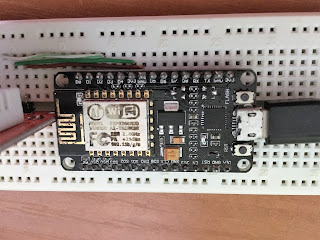
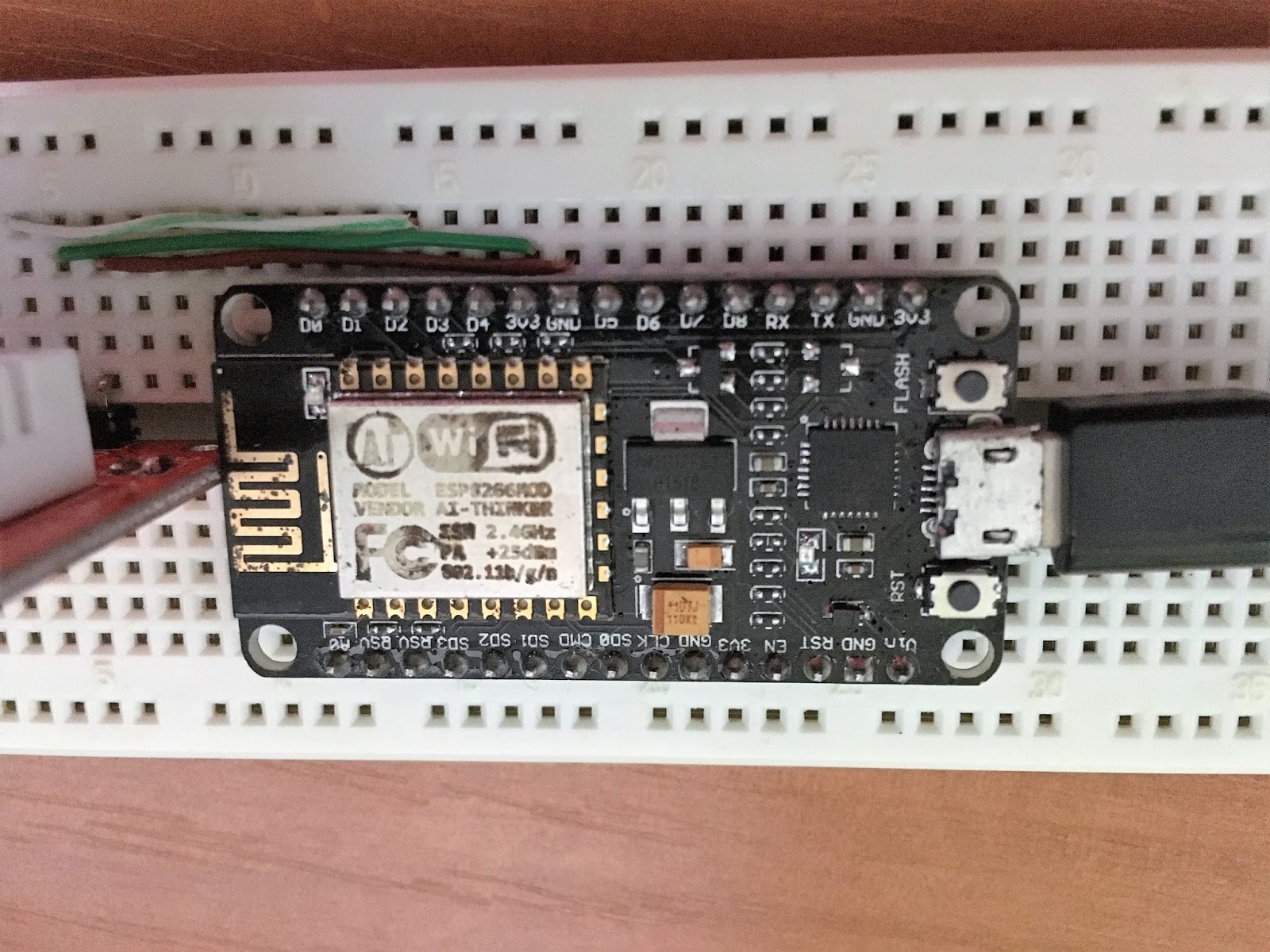
I ordered by ESP and DHT on most popular chinesee portal and I aimed for cheapest, so both cost me together a couple of bucks. DHT was delivered quite on time and in good shape, however ESP was more then 3 months in transit and looks like crap. Surprisingly, it works just fine :-)


In order to get started with ESP we need couple of things:
- USB cable
- ESP Flasher
- ESP firmware
- IDE

Start here if you use OSX or Linux machine.

Once you connect your ESP to windows machine with USB you should already see first signs of life from your module, blue led near WiFi antenna should blink randomly. Go to Settings -> Devices -> Connected Devices and look for something like this:

If you see it - great, your USB to Serial driver works just fine and your virtual COM port is whatever the numer is (my case - COM3)

Next step - flash your ESP with new software. Optional, but you will definitely have to flash your ESP multiple times and it's a piece of cake so let's make sure we have newest firmware on it. (And, by the way, if you are already here, it's just about time to at least  browse this resource - you will need it all the time while playing around with your ESP).

You can try to build  your own firmware here but I didn't bother. For the 1st time I just used last pre-compiled image available here. There are two flavors of image, float and integer. I took float, why not?

Yea, it was build almost year ago, but again, for the starter, we don't need fireworks.
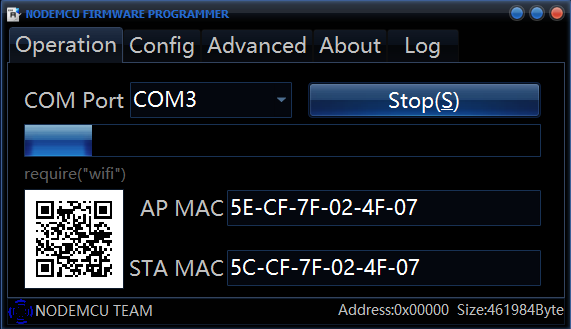
Flasher sits here along with short instruction how to use it. Just download 32bit or 64bit exec file and run. Go to config tab and click on gearwheel icon, select your firmware, leave offset at 0x0. Then get back to operation, make sure your COM port is set properly and click FLASH button. Progress bar should start becoming green and your firmware should be present on ESP in a couple of minutes.
Now it's time to see what this little baby can do for us. By the way, if flashing does not work for some reason, just disconnect everything you might have already connected to the unit.

There is a couple of different IDEs to use with this board, I picked up LuaLoader for no good reason While bit annoying if you want to talk to your device interactively, it works fine.

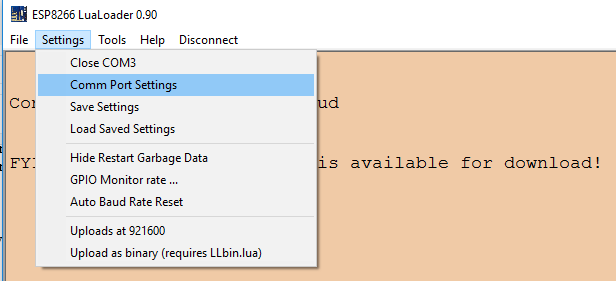
All you need to do is to download executable and run it. Go to Settings -> Comm Port Settings.
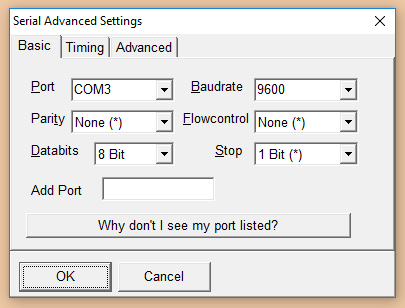
Then configure your serial port as presented.
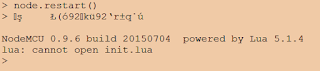
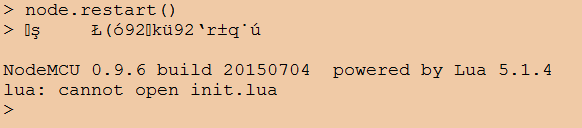
Then, hit Connect (Right to Settings). Then red "Restart" buton on right hand side. You should see something like this in main window.

If you see this - Excellent. Now it's time to do something useful with your dev board.

Sunday, January 29, 2017

Mobility Express on 3802i

Just got Cisco Aironet 3802i into my hands. Wanted to convert it into standalone aka autonomous mode... oh wait, it's gone. Mobility Express, this is what we have now.

Sounds quite charming, simply speaking you have Master AP which runs "WLC software" in addition to LWAPP software. It associates to itself al well as any other neighboring AP, so yes, if you have only one AP you can run both controller and access point functions on it.

Quick start guide and... my access point does not broadcast CiscoAirProvision SSID

On the console I see alternating messages:

[*06/15/2016 00:19:22.5103] CAPWAP State: Init
[*06/15/2016 00:19:22.5104] CAPWAP State: Discovery
[*06/15/2016 00:19:31.8579] CAPWAP State: Discovery
[*06/15/2016 00:19:31.8581] Did not get log server settings from DHCP.
[*06/15/2016 00:19:41.3609] CAPWAP State: Discovery
[*06/15/2016 00:19:41.3610] Did not get log server settings from DHCP.
[*06/15/2016 00:19:50.8633] CAPWAP State: Discovery

After research, this is what I need: Mobility Express User Guide 8.3 (previous versions do not include 3800 devices).

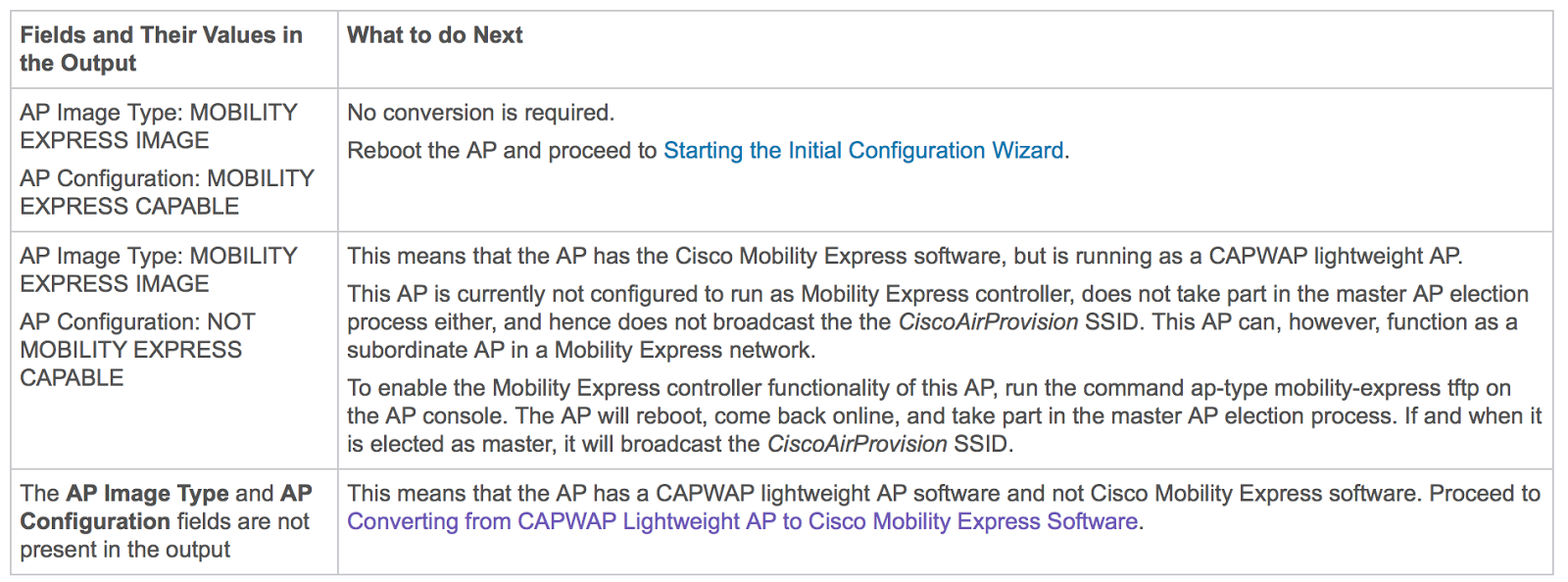
It says login to AP using Cisco/Cisco and do show version and look for "AP Image Type" and "AP Configuration" string in order to understand which version of software you use:


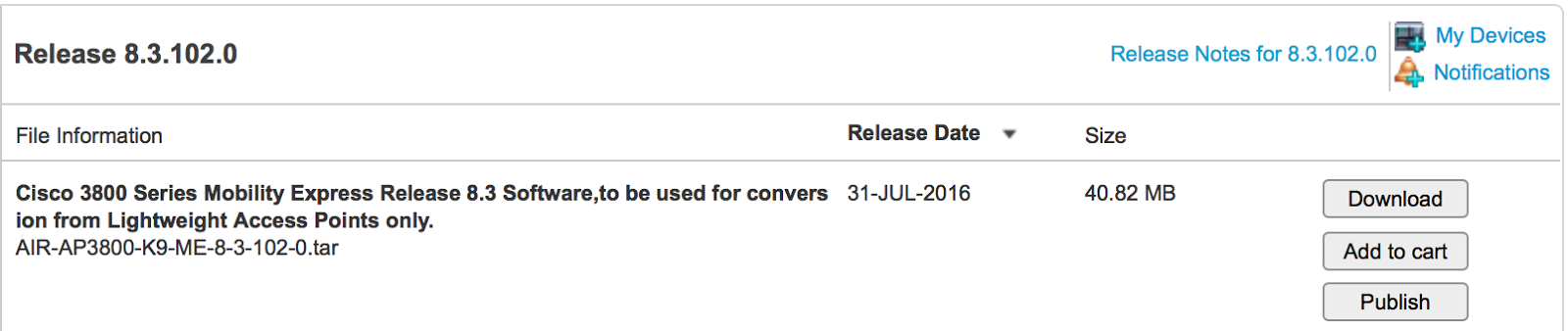
In my case - not present. Converting guide says to download tarball labeled "Software to be used for conversion from Lightweight Access Points only".

So I downloaded latest release for 3800:

The rest is also straightforward, get yourself tftp server, put your image there and use ap-type mobility-express tftp://ip/file command.

AP#ap-type mobility-express tftp://a.b.c.d/AIR-AP3800-K9-ME-8-3-102-0.tar
Starting the ME image download...
It may take a few minutes to finish download.
If it is longer, please abort command, check network connection and try again
########                                                                  11.6%[*06/15/2016 00:40:37.3653] CAPWAP State: Discovery
[*06/15/2016 00:40:37.3655] Did not get log server settings from DHCP.
###########################                                               38.8%[*06/15/2016 00:40:46.8688] CAPWAP State: Discovery
[*06/15/2016 00:40:46.8689] Did not get log server settings from DHCP.
###############################################                           66.4%[*06/15/2016 00:40:56.3713] CAPWAP State: Discovery
[*06/15/2016 00:40:56.3714] Did not get log server settings from DHCP.
###################################################################       93.6%[*06/15/2016 00:41:05.8742] CAPWAP State: Discovery
[*06/15/2016 00:41:05.8743] Did not get log server settings from DHCP.
#######################################################################  100.0%
Image downloaded, writing to flash...
do CHECK_ME, part1 is active part
tar: write error: No space left on device
sh: write error: No space left on device

Error, image file size is smaller than image+key+signature 0x0267e000 : 0x0283a839
Segmentation fault (core dumped)
part.bin signature verification failure, exit the script
Error: Image update failed.

Whoops! Again, ME User guide, quite handy:
After doing the same with .zip image, I got promising message on the console:

[*06/15/2016 00:51:38.8039] AP Type changed: CAPWAP to ME. AP Mode changed to flexconnect. AP Rebooting...

Access point went up with old software version. I try a couple of times more and I also upgraded lightweight software too:

AP#archive download-sw /reload tftp://a.b.c.d/ap3g3-k9w8-tar.153-3.JD.tar
(...)
do ACTIVATE, part1 is active part
activate part2, set BOOT to part2
AP primary version: 8.3.102.0
AP backup version: 8.2.20.16
Archive done.
Reload...

and then retry conversion to ME, both ways, without any luck.

AP#ap-type mobility-express tftp://a.b.c.d/AIR-AP3800-K9-ME-8-3-102-0.tar
Starting the ME image download...
It may take a few minutes to finish download.
(...)

Then during upgrades and reloads I spotted this errors:

Image downloaded, writing to flash...
do CHECK_ME, part2 is active part
tar: can't open '/tmp/part.tar': No such file or directory
No part.bin found
part to upgrade is part1
tar: can't open '/tmp/part.tar': No such file or directory
cp: can't stat '/bootpart/part1/info.ver': No such file or directory
activate part1, set BOOT to part1
grep: /tmp/info.ver: No such file or directory
AP primary version:
grep: /tmp/info.ver: No such file or directory
cp: can't stat '/tmp/part.tar': No such file or directory
Archive done.
[*07/29/2016 05:07:11.8915] AP Type changed: CAPWAP to ME. AP Mode changed to flexconnect. AP Rebooting...
[*07/29/2016 05:07:11.8966] AP Rebooting: Reset Request from Controller(AP Type Changed from CAPWAP to ME)

Writing reload timestamp (Fri Jul 29 05:07:11 UTC 2016) to disk

AP#[*07/29/2016 05:07:12.9426] umount: can't umount /storage: Device or resource busy
failed to unmount /storage; waiting 1s and trying again.
The system is going down NOW!05:07:13.9456]
Sent SIGTERM to all processes
[*07/29/2016 05:07:13.9512] device capwap0 left promiscuous mode
[*07/29/2016 05:07:13.9907] device capwap1 left promiscuous mode
Sent SIGKILL to all processes
Requesting system reboot83]
[07/29/2016 05:07:15.9400] reboot: Restarting system

And during booting:

UBIFS: mounted UBI device 0, volume 0, name "part1"
UBIFS: mounted read-only
UBIFS: file system size:   65646592 bytes (64108 KiB, 62 MiB, 517 LEBs)
UBIFS: journal size:       8888320 bytes (8680 KiB, 8 MiB, 70 LEBs)
UBIFS: media format:       w4/r0 (latest is w4/r0)
UBIFS: default compressor: LZO
UBIFS: reserved for root:  0 bytes (0 KiB)
part1/part.bin not found!
ubifsload - load file from an UBIFS filesystem

Usage:
ubifsload <addr> <filename> [bytes]
    - load file 'filename' to address 'addr'
Unable to load image part1/part.bin
Trying alternate UBIFS partition part2
UBIFS: mounted UBI device 0, volume 1, name "part2"
UBIFS: mounted read-only
UBIFS: file system size:   65646592 bytes (64108 KiB, 62 MiB, 517 LEBs)
UBIFS: journal size:       8888320 bytes (8680 KiB, 8 MiB, 70 LEBs)
UBIFS: media format:       w4/r0 (latest is w4/r0)
UBIFS: default compressor: LZO
UBIFS: reserved for root:  0 bytes (0 KiB)
Loading file 'part2/part.bin' to addr 0x02000000 with size 25215697 (0x0180c2d1)...
Done

Looks like we have two alternate boot partitions part1 and part2. Looks like installer is trying to install new image to part1 (it fails) while preserving image installed to part2 as a backup.

In case of emergency, it fail over to old image which is exactly what is happening to me.

So, I tried to set boot to part 1 once again manually and reload


AP#config boot path 1
AP#show boot
BOOT path-list:      part1
Console Baudrate:    9600
Enable Break:        yes
Manual Boot:         no
Memory Debug:        no
AP#reload
Proceed with reload? [confirm]

cli: AP Rebooting: CLI triggered reboot(reload command)

No luck, result was exactly the same as previously.
What if part1 is faulty indeed and we are stuck because installer see part2 as active and keep installing on part1? Maybe it can be cheated to think part1 is active and install to part2?
Risky, because in cause of failure we don't have backup but yea, what the heck.

THIS MAY CAUSE SERIOUS ISSUES WITH YOUR AP. YOU HAVE BEEN WARNED.

Interestingly enough, after I did this my installer still was smart enough to know that true active disk is part2, but at the same time it was able to successfully install image on part1 and boot from there.

AP#config boot path 1
AP#show boot
BOOT path-list:      part1
Console Baudrate:    9600
Enable Break:        yes
Manual Boot:         no
Memory Debug:        no
AP#ap-type mobility-express tftp://a.b.c.d/AIR-AP3800-K9-ME-8-3-102-0.tar
Starting the ME image download...
It may take a few minutes to finish download.
If it is longer, please abort command, check network connection and try again
#######################################################################   99.8%
Image downloaded, writing to flash...
do CHECK_ME, part2 is active part
Verify returns 0
part to upgrade is part1
activate part1, set BOOT to part1
AP primary version: 8.3.102.0
Archive done.
[*07/29/2016 05:20:14.9008] AP Type changed: CAPWAP to ME. AP Mode changed to flexconnect. AP Rebooting...
[*07/29/2016 05:20:14.9063] AP Rebooting: Reset Request from Controller(AP Type Changed from CAPWAP to ME)

(...)

UBIFS: mounted UBI device 0, volume 0, name "part1"
UBIFS: mounted read-only
UBIFS: file system size:   65646592 bytes (64108 KiB, 62 MiB, 517 LEBs)
UBIFS: journal size:       8888320 bytes (8680 KiB, 8 MiB, 70 LEBs)
UBIFS: media format:       w4/r0 (latest is w4/r0)
UBIFS: default compressor: LZO
UBIFS: reserved for root:  0 bytes (0 KiB)
Loading file 'part1/part.bin' to addr 0x02000000 with size 42182713 (0x0283a839)...
Done
SF: Detected N25Q32A with page size 64 KiB, total 4 MiB
Checking image signing.
This could take up to 40 seconds. Please wait...
Image signing verification success, continue to run...

(...)

Ok it works!

AP#show version | i MOBILITY
AP Image type    : MOBILITY EXPRESS IMAGE
AP Configuration : MOBILITY EXPRESS CAPABLE

After another series of console messages I can see confirmation that it work correctly:

Enabling Controller Provisioning
 Configuring management interface
 Enabling mgmt via wireless
 Enabling Provisioning SSID
 SSID: CiscoAirProvision, Admin Status: 1, Interface Name: management, 802.11 Auth: WPA2-PSK,  Wi-Fi Protected Access : Enabled

So I can jump into this SSID and carry on with configuration from the GUI.

Connect to CiscoAirProvision SSID using key "password", go to http://192.168.1.1 and very nice wizard will take you from there.

Edit 16.03.2017:
I had a lot of issues with WiFi after upgrade from 3700 to 3800. Including some devices failed to connect, some failed after couple of days and AP restart was required, RF Optimization had to be turned of because of similar reasons. It was so serious that I almost decided to get back to 3700. At the end of the day I found out that there's new software version for that AP, previously there was only one software available. I'm still keeping my fingers crossed, but looks like after upgrade to AIR-AP3800-K9-ME-8-3-111-0 everything is all right.
Sunday, December 25, 2016

Multi-Chassis Etherchannel (MEC)

What is rationale and benefits behind this?

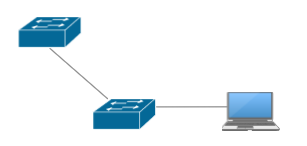
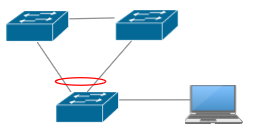
Let's start with some basics. We have an user connected to access switch. Which is connected to some distribution switch upstream.


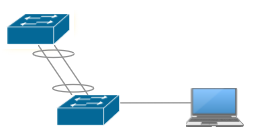
This works until distribution switch or link fail. How do we make it better? Use Etherchannel.


While we still depend on failure of distribution switch, we are now protected from single link failure and bandwidth available to access switch has been almost* doubled.
Benefits of current topology are:
- STP consider etherchannel as one link - will NOT engage and recalculate L2 topology after single link failure
- Practically zero switchover time
- Both links are used at tue same time
But still couple of issues are not resolved:
- failure of distribution switch kills connectivity
- completely equal utilization of both links is very hard to achieve; having doubled bandwidth by having number of links doubled is not possible

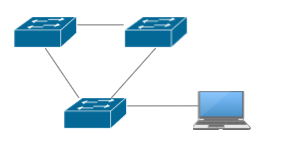
Now let's consider different topology with paralel connections to two distribution switches.


It's better for sure, as right now we don't rely on only one distribution switch. Should one of them fail, we can still have our network access through other one. This is also resilient to single link failure.
Drawbacks? Yes, a couple:
- Spanning tree must be enabled in order to make sure there are no L2 loops in the network
- One of uplinks will be permanently blocked, so we pay for two connections and use only one
- after failure of active link, connectivity could be interrupted for amount of time needed by STP to recalculate network topology.

Multichassis etherchannel is a hybrid topology which allows to get the best of dual homing and bundling separate connections together at the same time.


Resilient to single switch or link failure. Both links used at the same time, and single link failure does not trigger topology recalculation.
Although it seems perfect, we still need to remember that there are some limitations, too. First of all, it adds complexity to environment, especially when control plane of distibution switches are separated like Cisco vPC (Virtual Port Channel available on Nexus switches) does. In other implementations they can be joined together like Cisco VSS (Virtual Switching System available on Catalyst 6xxx switches) which basically turns two different switches into one.


Problem
Single homed
Dual homed
Ether Channel
MEC
Switch failure breaks connectivity
YES
NO
YES
NO
Link Failure breaks connectivity
YES
NO
NO
NO
Cannot use all connections
NO
YES
NO
NO
Link failure triggers topology change
YES
YES
NO
NO

Tuesday, December 20, 2016

Destination net unreachable? Fine!

Amazing, today I encountered internet link failure (again) and I was trying to ping google. Interesting how my Windows interprets ping results:

PS C:\Users\me> ping 8.8.8.8 -t

Pinging 8.8.8.8 with 32 bytes of data:
Reply from 192.168.66.1: Destination net unreachable.
Request timed out.
Reply from 192.168.66.1: Destination net unreachable.
Request timed out.
Reply from 192.168.66.1: Destination net unreachable.
Request timed out.
Reply from 192.168.66.1: Destination net unreachable.
Request timed out.
Reply from 192.168.66.1: Destination net unreachable.
Request timed out.
Reply from 192.168.66.1: Destination net unreachable.

Ping statistics for 8.8.8.8:
    Packets: Sent = 31, Received = 26, Lost = 5 (16% loss),
Control-C
PS C:\Users\me>


Led stripes

Being huge fan of led stripes I've recently installed a couple of them in my kitchen to provide light when I prepare food. Work area under cupboard is usually quite dark. So I just got rid of halogen lights and installed led stripe.
Also, I installed another couple of stripes as ambient light in my living room and bedroom.
Then I went for Christmas decoration light on my balcony :-)

With that being said I earned some experience with led stripes, I made a couple of good and bad purchases. I left with three lots of spare stripes and couple of spare power supplies. Those are the things I learned during that time:

- first stripe I bought back in 2011 and (surprisingly) I still use it today. It was installed as ambient light in my living room, then it was painted twice so it wasn't shining quite well. I decided to replace it with new one. Once I removed it I cleaned it up and guess what. Still works perfectly. I reused it for ambient light in my bedroom as it does not produce too much light.

 - Then I stopped, because back then it was quite expensive (cheapest 3528 price was more than 3x 5630 price as of Today).

 - I bought waterproof stripe of 5630's for my kitchen light. It is the strongest light I could find, although they already offer 5730 which does the same but with half of power consumption.

 - Waterproof led tape is quite heavy, so if you stick it to ceiling it may fall off. From my experience, stripes with 3m tape are the best (make sure it's original). Waterproof stripe is also more expensive.

- If you are not going with your led stripes outside or to really challenging environment, don't go for waterproof (I have never tried it in the bathroom, however).

 - I dropped idea of having waterproof stripe in my kitchen and ordered regular one. It has been working perfectly for a couple of months and really, I don't expect any troubles with it.

 - Sales people usually are declaring Watt consumption but from my experience it is usually lower then declared. Before purchase of power supply, I usually verify how much power my stripe is consuming using multimeter and add 20% of buffer to make sure power supply does not work at 100% capacity (will damage itself quickly if yes)

 - For some reason I also started with waterproof power supplies and I already had to replace three out of four. For home installation it does not make any sense, so finally I also replaced them. Again,  if you really don't need IP67, don't go for it.

- Also, waterproof is difficult to reconnect because you will have to damage protective silicone shield and then rebuild it somehow

 - White cold is... cold. It is good for very modern interiors but if you want to make your home sweet home or add ambient light, white warm is good. For my kitchen lights I used white neutral and I am quite happy about it.

 - It doesn't make really sense to me to buy led stripe with less than 60 LEDs per meter unless you really want to have particular LEDs clearly visible.

- One of very often emphasized feature of LED stripes is ability to cut and reconnect. To do this you need some very basic cutting/soldering skills. Please keep in mind that once you solder it, stripe is not flexible in that place anymore. If you buy a lot of 5m you can expect it to be soldered couple of times already.

- 90 degrees cornering with LED stripes is quite challenging

This is my spec cheatsheet (values are taken from LED specs, and by the way, 99% of LEDs used in stripes are made by Epistar.

LED Type Lumens per diode Lumens per meter Power draw per meter My comments
35286lm 360lm 4.8W This is most likely 1st one I have bought. It is excellent as an ambient light and if you hide it behind the corner, with 300leds per meter you will see continuous light
505018lm 1080lm 14.4W
283525lm 1500lm 10,8W
563060lm 3600lm 18WThis is the one I bought recently. Excellent if you have work area you need to bring some light into. It is also okay as an ambient light but expect it will also bring a lot of light to the environment. If you just want to emphasize something and leave the rest of the room dark, just go for 3528.
673060lm 3600lm 9,6W Looks very promising as it delivers as much light as 5630 only power consumtion is reduced by 50%. I will definitely try it in the future.

And, by the way, Let type is just size of the LED. For example, 2835 = 2,8mm x 3,5mm

Have fun with your LED installations.

Saturday, November 22, 2014

Your own linux-based iSCSI Target? S-I-M-P-L-E!

I took for granted that setting up iSCSI target on linux would be one of most time-consuming and complicated part of all this fun. I couldn't be more wrong. I have to admit that I've spent too much time on researching this topic, but once I've found right software it went quite smooth. 30 minutes tops, but let's start from the beginning.

I'm still struggling with my new home lab build-out. Hopefully I'm moving forward, or at least today ASUS confirmed officially that even so far they were unable to reproduce my memory isue, they are investigating same thing reported from Czech Republic. 

Part of the lab design (which is still only in my mind but no worries, I'll put it here soon) is nested ESXi hosts with external iSCSI storage. I'd love to have FC, but its quite costly, noisy, take too much space and electricity. Too bad. Anyway having this nested ESXi design would allow me to train most interesting HA features of VMware and allow me to have semi-centralized storage solution. Here's the nasty picture of what I'm trying to accomplish:

Quick & Dirty, but gives the idea

After I've finally identified right software, which is (obviously) iscsitarget (tada.wav!). I spent some time figuring out how to make it works with linux v3.16. Quick lecture of README, and I've created my /etc/ietd.conf:

Target iqn.2014-11.my.own.iscsi:nESXi.4T
 Lun 0 Path=/dev/sdb,Type=blockio,ScsiID=sdb,ScsiSN=SDBHDD-1500-01
 Lun 1 Path=/dev/sdc,Type=blockio,ScsiID=sdc,ScsiSN=SDCHDD-1500-01

No fireworks here, I know, but there is no point on tuning everything from the very beginning, especially there is a great probability that defaults would be just fine for me. Anyway, reading man ietd.conf will make no harm.

/etc/init.d/ietd start 

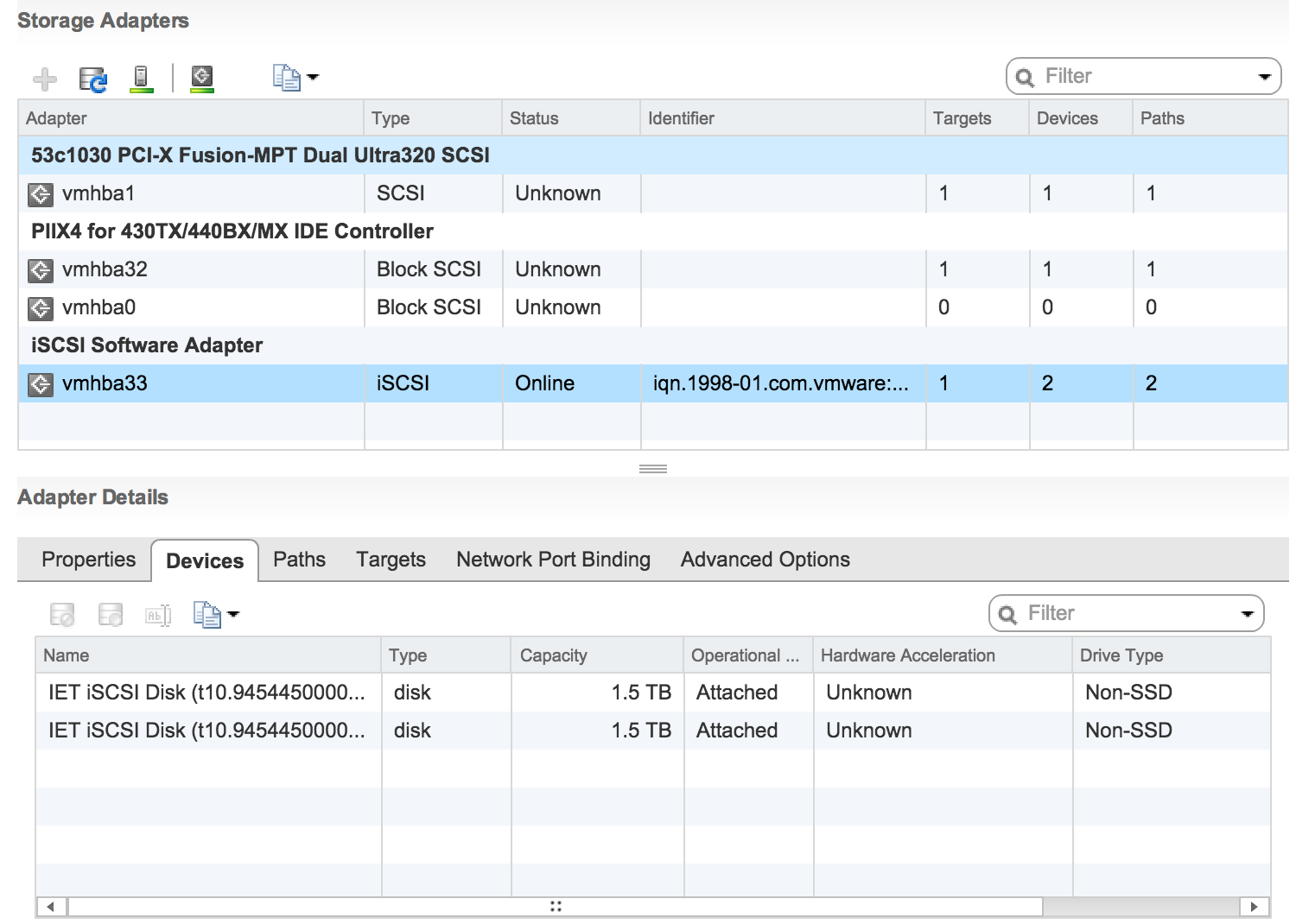
and... voila! VMware quickly discovered my luns. Formating them, creating and mounting datastores was only a formality.


Now when I have my nested storage set up and mounted to both hypervisors, I can't wait to deploy some vms!


Tuesday, November 18, 2014

How would you draw a kernel compilation?

... Using 10 physical cores effectively meaning 20 logical CPUs?

Well, I'd draw it like that.

One picture, a thousands words.