Amazing, today I encountered internet link failure (again) and I was trying to ping google. Interesting how my Windows interprets ping results:
PS C:\Users\me> ping 8.8.8.8 -t
Pinging 8.8.8.8 with 32 bytes of data:
Reply from 192.168.66.1: Destination net unreachable.
Request timed out.
Reply from 192.168.66.1: Destination net unreachable.
Reply from 192.168.66.1: Destination net unreachable.
Reply from 192.168.66.1: Destination net unreachable.
Reply from 192.168.66.1: Destination net unreachable.
Request timed out.
Reply from 192.168.66.1: Destination net unreachable.
Reply from 192.168.66.1: Destination net unreachable.
Reply from 192.168.66.1: Destination net unreachable.
Reply from 192.168.66.1: Destination net unreachable.
Request timed out.
Reply from 192.168.66.1: Destination net unreachable.
Reply from 192.168.66.1: Destination net unreachable.
Request timed out.
Reply from 192.168.66.1: Destination net unreachable.
Reply from 192.168.66.1: Destination net unreachable.
Reply from 192.168.66.1: Destination net unreachable.
Reply from 192.168.66.1: Destination net unreachable.
Reply from 192.168.66.1: Destination net unreachable.
Reply from 192.168.66.1: Destination net unreachable.
Reply from 192.168.66.1: Destination net unreachable.
Reply from 192.168.66.1: Destination net unreachable.
Reply from 192.168.66.1: Destination net unreachable.
Reply from 192.168.66.1: Destination net unreachable.
Reply from 192.168.66.1: Destination net unreachable.
Request timed out.
Reply from 192.168.66.1: Destination net unreachable.
Reply from 192.168.66.1: Destination net unreachable.
Reply from 192.168.66.1: Destination net unreachable.
Reply from 192.168.66.1: Destination net unreachable.
Ping statistics for 8.8.8.8:
Packets: Sent = 31, Received = 26, Lost = 5 (16% loss),
Control-C
PS C:\Users\me>
Tuesday, December 20, 2016

Led stripes
Being huge fan of led stripes I've recently installed a couple of them in my kitchen to provide light when I prepare food. Work area under cupboard is usually quite dark. So I just got rid of halogen lights and installed led stripe.
Also, I installed another couple of stripes as ambient light in my living room and bedroom.
Then I went for Christmas decoration light on my balcony :-)
With that being said I earned some experience with led stripes, I made a couple of good and bad purchases. I left with three lots of spare stripes and couple of spare power supplies. Those are the things I learned during that time:
- first stripe I bought back in 2011 and (surprisingly) I still use it today. It was installed as ambient light in my living room, then it was painted twice so it wasn't shining quite well. I decided to replace it with new one. Once I removed it I cleaned it up and guess what. Still works perfectly. I reused it for ambient light in my bedroom as it does not produce too much light.
- Then I stopped, because back then it was quite expensive (cheapest 3528 price was more than 3x 5630 price as of Today).
- I bought waterproof stripe of 5630's for my kitchen light. It is the strongest light I could find, although they already offer 5730 which does the same but with half of power consumption.
- Waterproof led tape is quite heavy, so if you stick it to ceiling it may fall off. From my experience, stripes with 3m tape are the best (make sure it's original). Waterproof stripe is also more expensive.
- If you are not going with your led stripes outside or to really challenging environment, don't go for waterproof (I have never tried it in the bathroom, however).
- I dropped idea of having waterproof stripe in my kitchen and ordered regular one. It has been working perfectly for a couple of months and really, I don't expect any troubles with it.
- Sales people usually are declaring Watt consumption but from my experience it is usually lower then declared. Before purchase of power supply, I usually verify how much power my stripe is consuming using multimeter and add 20% of buffer to make sure power supply does not work at 100% capacity (will damage itself quickly if yes)
- For some reason I also started with waterproof power supplies and I already had to replace three out of four. For home installation it does not make any sense, so finally I also replaced them. Again, if you really don't need IP67, don't go for it.
- Also, waterproof is difficult to reconnect because you will have to damage protective silicone shield and then rebuild it somehow
- White cold is... cold. It is good for very modern interiors but if you want to make your home sweet home or add ambient light, white warm is good. For my kitchen lights I used white neutral and I am quite happy about it.
- It doesn't make really sense to me to buy led stripe with less than 60 LEDs per meter unless you really want to have particular LEDs clearly visible.
- One of very often emphasized feature of LED stripes is ability to cut and reconnect. To do this you need some very basic cutting/soldering skills. Please keep in mind that once you solder it, stripe is not flexible in that place anymore. If you buy a lot of 5m you can expect it to be soldered couple of times already.
- 90 degrees cornering with LED stripes is quite challenging
This is my spec cheatsheet (values are taken from LED specs, and by the way, 99% of LEDs used in stripes are made by Epistar.
And, by the way, Let type is just size of the LED. For example, 2835 = 2,8mm x 3,5mm
Have fun with your LED installations.
Also, I installed another couple of stripes as ambient light in my living room and bedroom.
Then I went for Christmas decoration light on my balcony :-)
With that being said I earned some experience with led stripes, I made a couple of good and bad purchases. I left with three lots of spare stripes and couple of spare power supplies. Those are the things I learned during that time:
- first stripe I bought back in 2011 and (surprisingly) I still use it today. It was installed as ambient light in my living room, then it was painted twice so it wasn't shining quite well. I decided to replace it with new one. Once I removed it I cleaned it up and guess what. Still works perfectly. I reused it for ambient light in my bedroom as it does not produce too much light.
- Then I stopped, because back then it was quite expensive (cheapest 3528 price was more than 3x 5630 price as of Today).
- I bought waterproof stripe of 5630's for my kitchen light. It is the strongest light I could find, although they already offer 5730 which does the same but with half of power consumption.
- Waterproof led tape is quite heavy, so if you stick it to ceiling it may fall off. From my experience, stripes with 3m tape are the best (make sure it's original). Waterproof stripe is also more expensive.
- If you are not going with your led stripes outside or to really challenging environment, don't go for waterproof (I have never tried it in the bathroom, however).
- I dropped idea of having waterproof stripe in my kitchen and ordered regular one. It has been working perfectly for a couple of months and really, I don't expect any troubles with it.
- Sales people usually are declaring Watt consumption but from my experience it is usually lower then declared. Before purchase of power supply, I usually verify how much power my stripe is consuming using multimeter and add 20% of buffer to make sure power supply does not work at 100% capacity (will damage itself quickly if yes)
- For some reason I also started with waterproof power supplies and I already had to replace three out of four. For home installation it does not make any sense, so finally I also replaced them. Again, if you really don't need IP67, don't go for it.
- Also, waterproof is difficult to reconnect because you will have to damage protective silicone shield and then rebuild it somehow
- White cold is... cold. It is good for very modern interiors but if you want to make your home sweet home or add ambient light, white warm is good. For my kitchen lights I used white neutral and I am quite happy about it.
- It doesn't make really sense to me to buy led stripe with less than 60 LEDs per meter unless you really want to have particular LEDs clearly visible.
- One of very often emphasized feature of LED stripes is ability to cut and reconnect. To do this you need some very basic cutting/soldering skills. Please keep in mind that once you solder it, stripe is not flexible in that place anymore. If you buy a lot of 5m you can expect it to be soldered couple of times already.
- 90 degrees cornering with LED stripes is quite challenging
This is my spec cheatsheet (values are taken from LED specs, and by the way, 99% of LEDs used in stripes are made by Epistar.
| LED Type | Lumens per diode | Lumens per meter | Power draw per meter | My comments |
| 3528 | 6lm | 360lm | 4.8W | This is most likely 1st one I have bought. It is excellent as an ambient light and if you hide it behind the corner, with 300leds per meter you will see continuous light |
| 5050 | 18lm | 1080lm | 14.4W | |
| 2835 | 25lm | 1500lm | 10,8W | |
| 5630 | 60lm | 3600lm | 18W | This is the one I bought recently. Excellent if you have work area you need to bring some light into. It is also okay as an ambient light but expect it will also bring a lot of light to the environment. If you just want to emphasize something and leave the rest of the room dark, just go for 3528. |
| 6730 | 60lm | 3600lm | 9,6W | Looks very promising as it delivers as much light as 5630 only power consumtion is reduced by 50%. I will definitely try it in the future. |
And, by the way, Let type is just size of the LED. For example, 2835 = 2,8mm x 3,5mm
Have fun with your LED installations.
Saturday, November 22, 2014
Your own linux-based iSCSI Target? S-I-M-P-L-E!

I took for granted that setting up iSCSI target on linux would be one of most time-consuming and complicated part of all this fun. I couldn't be more wrong. I have to admit that I've spent too much time on researching this topic, but once I've found right software it went quite smooth. 30 minutes tops, but let's start from the beginning.
I'm still struggling with my new home lab build-out. Hopefully I'm moving forward, or at least today ASUS confirmed officially that even so far they were unable to reproduce my memory isue, they are investigating same thing reported from Czech Republic.
Part of the lab design (which is still only in my mind but no worries, I'll put it here soon) is nested ESXi hosts with external iSCSI storage. I'd love to have FC, but its quite costly, noisy, take too much space and electricity. Too bad. Anyway having this nested ESXi design would allow me to train most interesting HA features of VMware and allow me to have semi-centralized storage solution. Here's the nasty picture of what I'm trying to accomplish:
 |
| Quick & Dirty, but gives the idea |
After I've finally identified right software, which is (obviously) iscsitarget (tada.wav!). I spent some time figuring out how to make it works with linux v3.16. Quick lecture of README, and I've created my /etc/ietd.conf:
Target iqn.2014-11.my.own.iscsi:nESXi.4T
Lun 0 Path=/dev/sdb,Type=blockio,ScsiID=sdb,ScsiSN=SDBHDD-1500-01
Lun 1 Path=/dev/sdc,Type=blockio,ScsiID=sdc,ScsiSN=SDCHDD-1500-01
No fireworks here, I know, but there is no point on tuning everything from the very beginning, especially there is a great probability that defaults would be just fine for me. Anyway, reading man ietd.conf will make no harm.
/etc/init.d/ietd start
and... voila! VMware quickly discovered my luns. Formating them, creating and mounting datastores was only a formality.
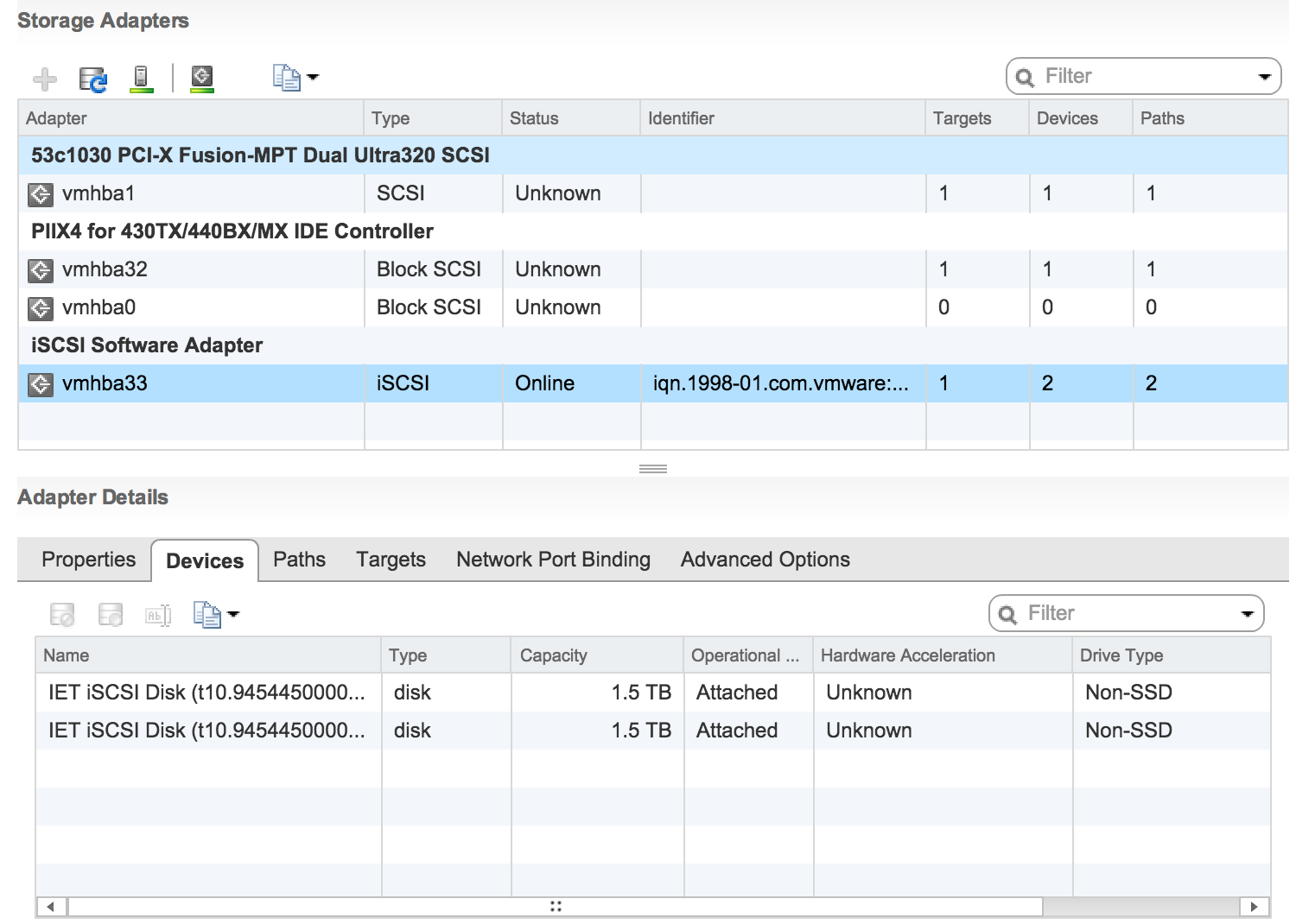
Now when I have my nested storage set up and mounted to both hypervisors, I can't wait to deploy some vms!
Target iqn.2014-11.my.own.iscsi:nESXi.4T
Lun 0 Path=/dev/sdb,Type=blockio,ScsiID=sdb,ScsiSN=SDBHDD-1500-01
Lun 1 Path=/dev/sdc,Type=blockio,ScsiID=sdc,ScsiSN=SDCHDD-1500-01
No fireworks here, I know, but there is no point on tuning everything from the very beginning, especially there is a great probability that defaults would be just fine for me. Anyway, reading man ietd.conf will make no harm.
/etc/init.d/ietd start
and... voila! VMware quickly discovered my luns. Formating them, creating and mounting datastores was only a formality.
Now when I have my nested storage set up and mounted to both hypervisors, I can't wait to deploy some vms!
Tuesday, November 18, 2014
How would you draw a kernel compilation?
Well, I'd draw it like that.
 |
| One picture, a thousands words. |
Sunday, November 16, 2014
The more you get into it...

...the more complicated it becomes. Yes, again I have to say that ASUS owned another few hours of mine and only result I achieved is another support case created. How cool is that?
A few days back I finally received a pair of brand new, undamaged hard drives. I even made a picture of them to emphasize this crucial moment in my life. This time they are spinning well, no excess noise or vibration... And honestly, that's all I can say about them right now, because it seems that my LSI MegaRAID on my ASUS Board is not functioning properly...
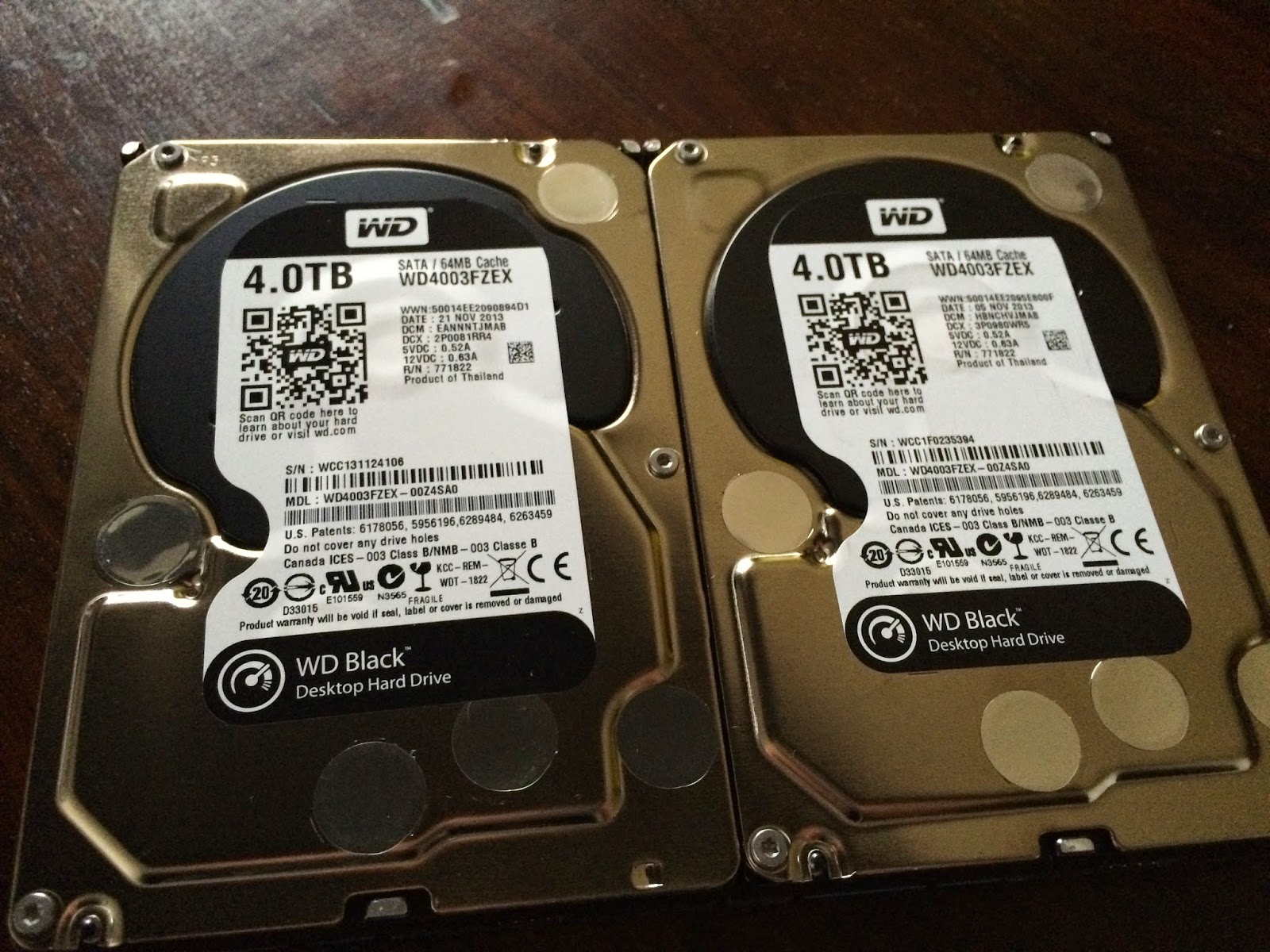
So today I wanted to pass-through the RAID controller to ESXi host and then having real hardware access to the controller itself. Having all this capabilities incl. SMART etc then create software RAID-1 under Linux vMachine. Yup, dumb idea. Since I already have my SSD connected to this controller, I cannot pass it through to VM. Looks like I didn't think over it enough.
Looking for work-around? Use on-board LSI MegaRAID controller to have RAID-1 things handled by the hardware in the background and then create 4TB virtual disk. Probably not a best available option ever, but still seems to be feasible. Okay, reboot, reconfiguration of raid BIOS configuration, init of array, here we go! Well... ESXi still see two drives. How weird is that?!
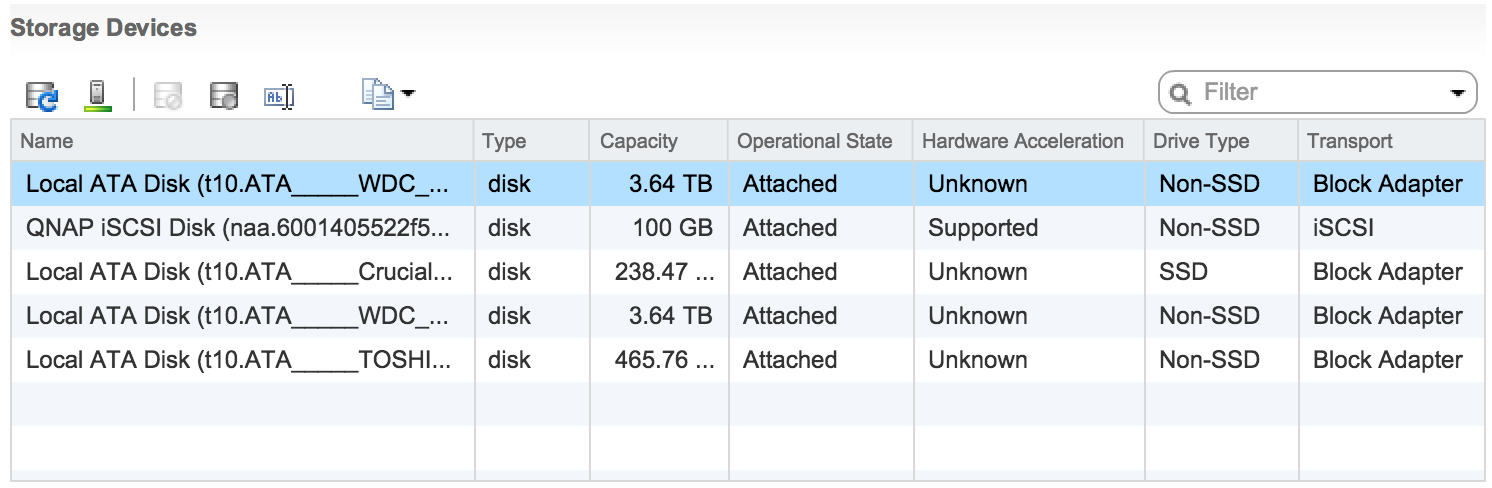
After a little bit of reserach I found out some information about not having raid enabled prior to installation of ESXi and missing modules and things like that. Well, drowning man will clutch at a straw, so I went through all the options including changing jumper on motherboard to switch to Intel Raid solution and then going back, disabling and enabling RAID in BIOS again... no luck. I've even gone ahead and created RAID configuration for disk which are not meant to work in RAID!

No luck, my ESXi still see Intel Patsburg controller. Instead of LSI MegaRAID.

Well, like I've said. Looks like I'm gonna keep ASUS guys busy for a quite bit of time.
VM Question? I'm here to help!
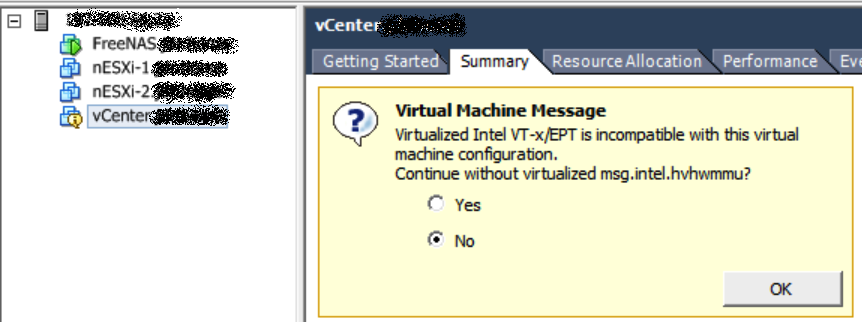
One of small irritating obstacles during my home virtual lab build out phase was VM question. It started to appear every single time i rebooted my machine after I've enabled VT-x to deploy nested 64bit ESXi instances.
<digression>
And, by the way. I'm probably only person all around the world who really enjoy new VMware web client. I Think that it is actually quite cool. It takes some time to get used, but when you do you'll love it. And since its meant to be the future of VMware and there is no OSX native client - Why not?
</digression>
So how to answer that question if vCenter is the VM who asks? Through CLI, of course!
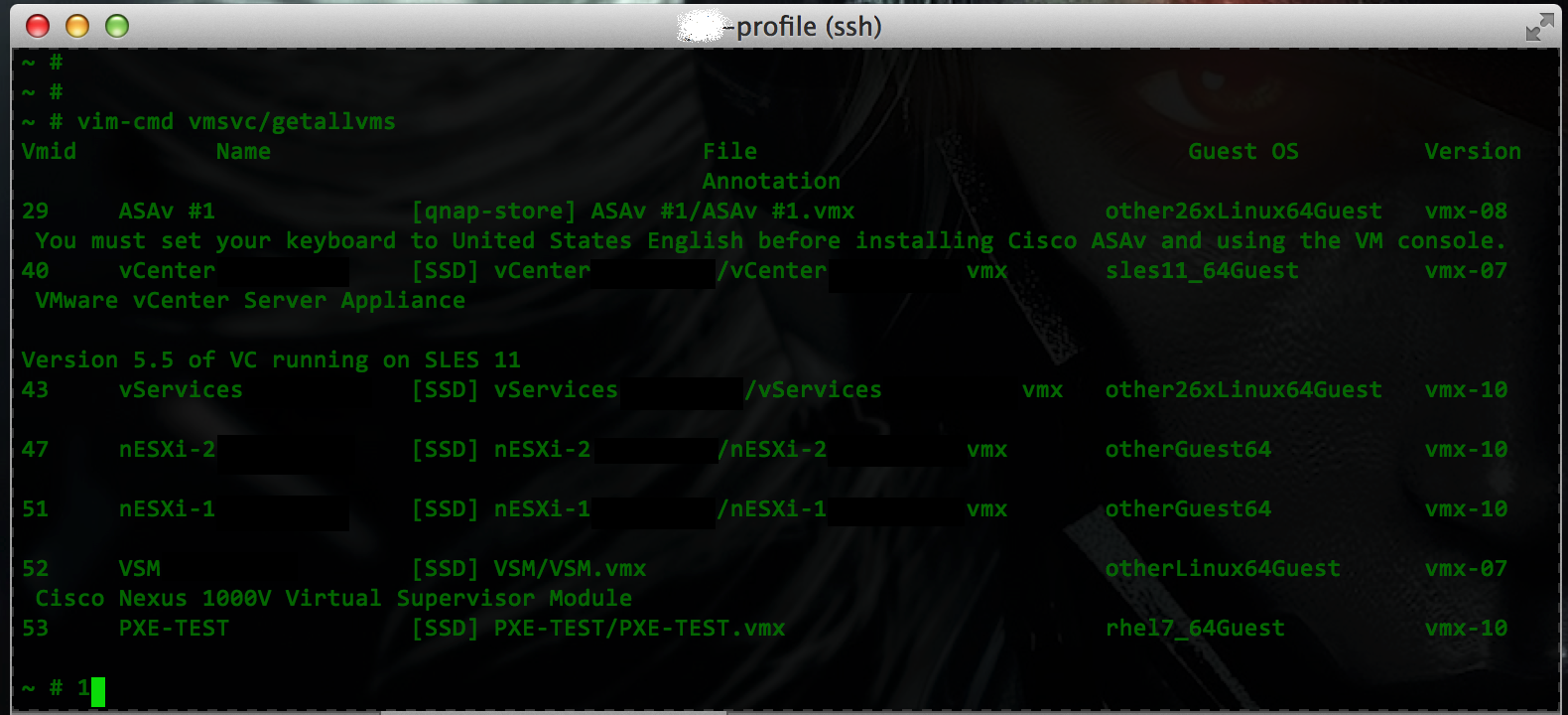
Step 1: Log in to ESX and list all virtual machines and their state:
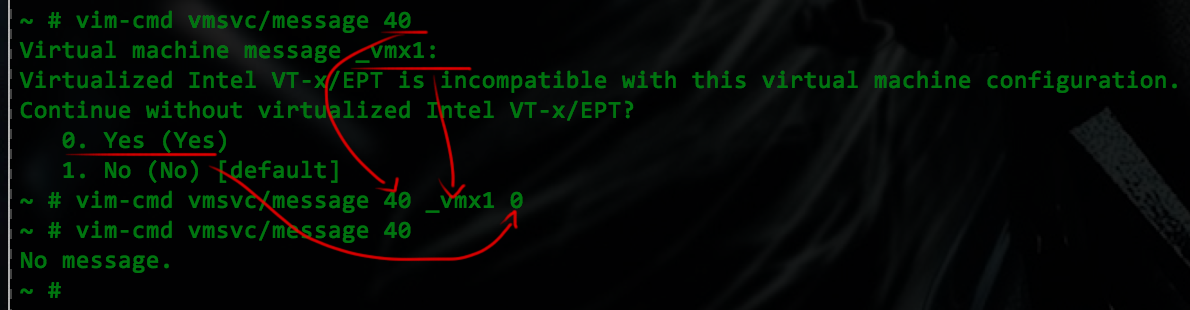
Step 2: Remember your VM ID and check if there is a question to answer:

Step 1: Log in to ESX and list all virtual machines and their state:
Step 3: Answer & verify:
By the way - VMware VM v.10 does not ask stupid questions :-)
Friday, November 14, 2014
Freedom or Fail?

Back to the point - idea was to boot some linux distribution to have working shell with basic toolset and test my SSD performance. Of course I'm a geek - I *had* to use PXE! My list of images was growing fast today. Not because I had so many needs, just because not everything was running as expected.
Enough to say, I was happy with PXE too fast - ESXi installer from PXE runs smoothly and I took it as a good sign. Not so fast though!
As you noticed my list now contains lots of different images now. Here you find full list with PXE boot result:
- Local Boot (BIOS Order) (PASS)
- ESXi Installer (PASS)
- FreeNAS Installer (FAIL)
- NAS4Free Installer (FAIL)
- OpenFiler Installer (FAIL)
- Knoppix Live DVD (FAIL)
- Ubuntu v14.10 (FAIL)
- Gentoo x64 Installer (FAIL)
Well, I have to say - Indeed I have chosen good image for a kickstart!
While I was able to "boot" almost all of them (all except Knoppix actually, most likely because of size of DVD image), it turned out that most of them is trying to mount CD somewhere in the middle of the boot process and that obviously failed miserably. There's no CD!
Next thing - booting from PXE/TFTP is quite slow and it takes a few minutes to download 327M VMware image. It was so slow that I've made some benchmarks:

While I was able to "boot" almost all of them (all except Knoppix actually, most likely because of size of DVD image), it turned out that most of them is trying to mount CD somewhere in the middle of the boot process and that obviously failed miserably. There's no CD!
Next thing - booting from PXE/TFTP is quite slow and it takes a few minutes to download 327M VMware image. It was so slow that I've made some benchmarks:
PXE/TFTP: 5m51sec // QNAP to Discoverer over GE wire
PXE/FTP: 0m50sec // QNAP to Discoverer over GE wire
PXE/FTP: 0m50sec // QNAP to Discoverer over GE wire
WGET: 0m27sec // QNAP to notebook, over 802.11ac wireless
Maybe it's not a huge issue since we only use PXE to boot installers, but its annoying. Switching to ftp speed-up multiple times!
Looks like my "brand new" shiny idea of installing everything over the network just blew up. I believe it is fixable but probably image-by-image. Here's a good example for best linux distribution ever. pxegrub.0? Sounds promising. Maybe next time...
Anyway, do you remember this little nasty thing that our hard drives vendors do to us? Normally in computer word we use binary counting, which effectively means that kilo=1024 and mega=1024*kilo=1024*1024=1 048 576. Hell, not for HDD manufacturers. They use this little cheat on us and count kilo as 1 000 and mega as 1 000 000. What is practical value of this? Real capacity of HDD is smaller than declared by vendor. It wasn't a big deal in '90 when biggest HDDs was like 20GB. Even now when you buy 0,5TB or 1TB HDD and it turns out to be 10% smaller it's something we just used to agree.
But I just bought 2x4.0TB drives and guess what? 4.0TB (Declared) == 3725MB (Real). I was cheated by 275GB on each drive! Thats insane!
Anyway, do you remember this little nasty thing that our hard drives vendors do to us? Normally in computer word we use binary counting, which effectively means that kilo=1024 and mega=1024*kilo=1024*1024=1 048 576. Hell, not for HDD manufacturers. They use this little cheat on us and count kilo as 1 000 and mega as 1 000 000. What is practical value of this? Real capacity of HDD is smaller than declared by vendor. It wasn't a big deal in '90 when biggest HDDs was like 20GB. Even now when you buy 0,5TB or 1TB HDD and it turns out to be 10% smaller it's something we just used to agree.
But I just bought 2x4.0TB drives and guess what? 4.0TB (Declared) == 3725MB (Real). I was cheated by 275GB on each drive! Thats insane!
Subscribe to:
Posts (Atom)